NSObject
∟NSResponder
∟NSView
∟NSControl
∟NSButton
基本クリックしたらアクション(メソッド)を実行するパーツ。
ON、OFF以外のMIXを追加したりも可。
ボタンタイプによってラジオボタン、スウォッチ、ON、OFFの維持など色々と変えることができるけど
掘り下げたらそこそこ複雑です。。。
   NSButton *button=[[NSButton alloc]initWithFrame:CGRectMake(100,100,100,100)];
   button.bezelStyle=4;
   button.title=@"ぼたん";
   button.action=@selector(actionA);
   [self.window.contentView addSubview:button];
| プロパティ名 |
読
専 |
効果 |
引数、戻り値 |
| allowsMixedState |
|
ON、OFF以外のもう一つの状態かの是非 |
BOOL |
| alternateImage |
|
押し込み時のボタン画像の設定 |
NSImage |
| alternateTitle |
|
ボタンタイプにより押し込み時のボタンタイトルの変更 |
NSString |
| attributedAlternateTitle |
|
ボタンタイプにより押し込み時NSAttributedStringのテキストでタイトルを設定 |
NSAttributedString |
| attributedTitle |
|
NSAttributedStringのテキストでタイトルを設定 |
NSAttributedString |
| bezelStyle |
|
ボタンデザインの設定 |
(下記参照) |
| image |
|
ボタン画像の設定 |
NSImage |
| imagePosition |
|
ボタンに画像を配置する場合の画像の配置 |
(下記参照) |
| isBordered |
○ |
ボタンの境界線の有無 |
BOOL |
| isTransparent |
○ |
ボタンが透明かの是非(透明でもボタンを押すことは可能) |
BOOL |
| sound |
|
ボタンを押した時に流す音を設定 |
NSSound |
| state |
|
ボタンの状態をNSIntegerで返す。ONなら1、OFFなら0、MIXなら−1を返す |
NSInteger |
| showsBorderOnlyWhileMouseInside |
|
マウスカーソルを乗せた時にだけ境界線を表示するかの有無 |
BOOL |
| title |
|
ボタンタイトルを設定 |
NSString |
| メソッド名 |
効果 |
| - (void)highlight:(BOOL)flag |
ボタンをON、OFFに限らずハイライト状態にします |
| - (void)setAllowsMixedState:(BOOL)flag |
ボタンにON、OFF以外のもう一つのMIX状態の生成 |
| - (void)setAlternateImage:(NSImage *)image |
押し込み時のボタン画像の設定 |
| - (void)setAlternateTitle:(NSString *)aString |
ボタンタイプにより押し込み時のボタンタイトルの設定 |
| - (void)setAttributedAlternateTitle:(NSAttributedString *)aString |
ボタンタイプにより押し込み時NSAttributedStringのテキストでタイトルを設定 |
| - (void)setAttributedTitle:(NSAttributedString *)aString |
NSAttributedStringのテキストでタイトルを設定 |
| - (void)setBezelStyle:(NSBezelStyle)bezelStyle |
マウスカーソルを乗せた時にだけ境界線を表示するかの有無 |
| - (void)setBordered:(BOOL)flag |
ボタンが透明かの是非(透明でもボタンを押すことは可能) |
| - (void)setButtonType:(NSButtonType)aType |
ボタンタイプを設定。下記参照。 |
| - (void)setImage:(NSImage *)anImage |
ボタン画像の設定 |
| - (void)setImagePosition:(NSCellImagePosition)aPosition |
ボタンの境界線の有無 |
| - (void)setNextState |
ボタンの一回押した状態にする。ON→OFF→MIX |
| - (void)setShowsBorderOnlyWhileMouseInside:(BOOL)show |
マウスカーソルを乗せた時にだけ境界線を表示するかの有無 |
| - (void)setSound:(NSSound *)aSound |
ボタンを押した時に流す音を設定 |
| - (void)setState:(NSInteger)value |
ボタンの状態を設定。ONなら1、OFFなら0、MIXならば−1 |
| - (void)setTitle:(NSString *)aString |
ボタンタイトルを設定 |
| - (void)setTransparent:(BOOL)flag |
ボタンデザインの設定 |
ボタンのタイプ<setButtonType>
| ボタンタイプ |
別
名 |
内容 |
| NSPushOnPushOffButton |
1 |
押し込み可 |
| NSToggleButton |
2 |
押し込み可、押し込み後alternate系の状態を保持する |
| NSSwitchButton |
3 |
チェックボックス |
| NSRadioButton |
4 |
ラジオボタン |
| NSMomentaryChangeButton |
5 |
押し込み可、押し込み後alternate系の状態は保持しない |
| NSOnOffButton |
6 |
NSPushOnPushOffButtonと一緒? |
| NSMomentaryPushInButton |
7 |
NSPushOnPushOffButtonと一緒? |
| NSMomentaryPushButton |
0 |
NSPushOnPushOffButtonと一緒? |
| NSMomentaryLight |
7 |
NSPushOnPushOffButtonと一緒? |
ボタンのベゼルスタイル<.bezelStyle>
| ボタンタイプ |
別
名 |
内容 |
| NSRoundedBezelStyle |
1 |
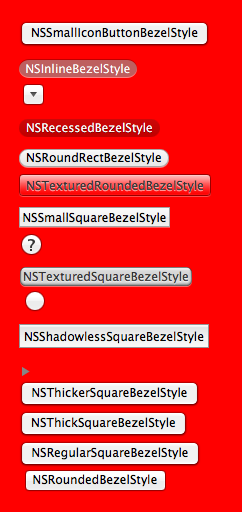 |
| NSRegularSquareBezelStyle |
2 |
| NSThickSquareBezelStyle |
3 |
| NSThickerSquareBezelStyle |
4 |
| NSDisclosureBezelStyle |
5 |
| NSShadowlessSquareBezelStyle |
6 |
| NSCircularBezelStyle |
7 |
| NSTexturedSquareBezelStyle |
8 |
| NSHelpButtonBezelStyle |
9 |
| NSSmallSquareBezelStyle |
10 |
| NSTexturedRoundedBezelStyle |
11 |
| NSRoundRectBezelStyle |
12 |
| NSRecessedBezelStyle |
13 |
| NSRoundedDisclosureBezelStyle |
14 |
| NSInlineBezelStyle |
15 |
| NSSmallIconButtonBezelStyle |
2 |
最終更新:2012年09月21日 23:03



