AutoSizeTextBox
MaxLength(半角)の長さにあわせてテキストボックスの幅が変更されるテキストボックス。
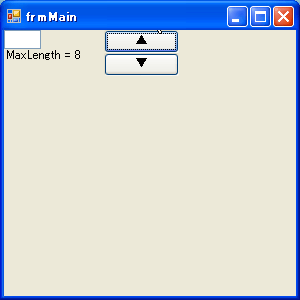
using System;
using System.Windows.Forms;
using System.Drawing;
using System.ComponentModel;

namespace WindowsFormsApplication1
{
    public partial class frmMain : Form
    {
        private Button btnUp = new Button();
        private Button btnDown = new Button();
        private ExTextBox txt = new ExTextBox();
        private Label lbl = new Label();

        /// <summary>
        /// コンストラクタ
        /// </summary>
        public frmMain()
        {
            InitializeComponent();

            this.btnUp.Text = "▲";
            this.Controls.Add(this.btnUp);
            this.btnUp.Location = new Point(100, 0);
            this.btnUp.Click += btnUp_Click;

            this.btnDown.Text = "▼";
            this.Controls.Add(this.btnDown);
            this.btnDown.Location = new Point(this.btnUp.Left, this.btnUp.Bottom);
            this.btnDown.Click += btnDown_Click;

            this.Controls.Add(this.txt);
            this.txt.Location = new Point(0, 0);
            this.txt.MaxLength = 8;

            this.Controls.Add(this.lbl);
            this.lbl.Location = new Point(0, this.txt.Bottom);
            this.lbl.Text = string.Format("MaxLength = {0}", this.txt.MaxLength);
        }

        private void btnUp_Click(object sender, EventArgs e)
        {
            this.txt.MaxLength += 1;
            this.lbl.Text = string.Format("MaxLength = {0}", this.txt.MaxLength);
        }

        private void btnDown_Click(object sender, EventArgs e)
        {
            this.txt.MaxLength -= 1;
            this.lbl.Text = string.Format("MaxLength = {0}", this.txt.MaxLength);
        }
    }

    public partial class ExTextBox : TextBox
    {
        private Boolean _AutoSize = true;

        public override int MaxLength
        {
            get
            {
                return base.MaxLength;
            }
            set
            {
                if (value >= 0 && value <= Int32.MaxValue)
                {
                    base.MaxLength = value;
                    ResizeWidth();
                }
            }
        }

        public override Boolean AutoSize
        {
            get
            {
                return _AutoSize;
            }
            set
            {
                _AutoSize = value;
            }
        }

        private void ResizeWidth()
        {
            try
            {
                if (_AutoSize)
                {
                    string str = string.Empty;
                    this.Width = TextRenderer.MeasureText(str.PadRight(MaxLength), this.Font).Width;
                }
            }
            catch (Exception ex)
            {
                MessageBox.Show(ex.Message);
            }
        }
    }

}
最終更新:2011年06月30日 20:51



