Instruction for importing models
Using Model From Vroid Hub(Recommended)
Access the Vroid Hub and use its API to import the model.
How to
1,In the main menu, select "Using Model from Vroid Hub"
2,the Vroid Hub login screen will come up automatically, log in and select the model you want to use.
Directly into iphone's storage
This is a way to transfer models directly to your iPhone's storage.
You can transfer models from Itune on your Mac PC or Windows PC.
How to
1,Connect PC and iPhone with Lightning Cable.
2,Select iPhone from Mac or iTunes and select the File tab.
3,Drag and drop the VRM file into "Character Recorder AR".
4,In the main menu,select "Using a local VRM model".
Download model file from external URL(from like GoogleDrive)
Transfer the model from URL of the file you have uploaded to online storage.
Be sure to follow the model's terms of service and make sure that the URL is not leaked to the outside.
How to
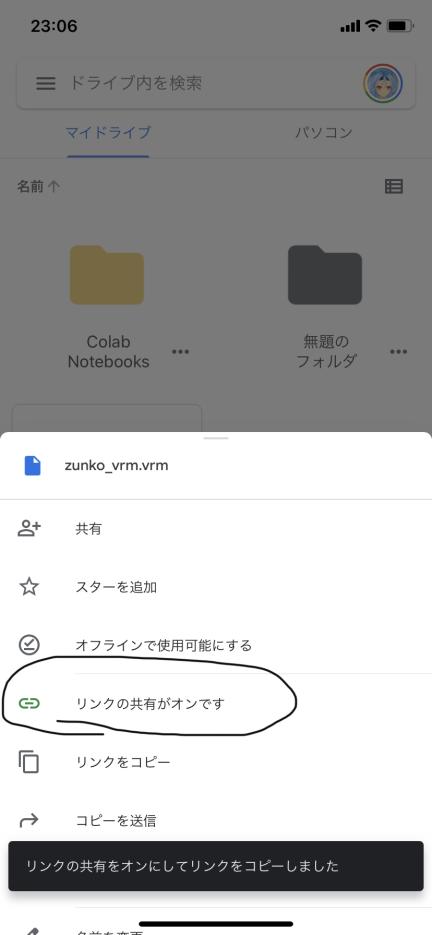
1,Upload a VRM file to online storage(Google Drive is recommended)
2,Click the share button of the link in the file and make it available to "everyone who knows the link".
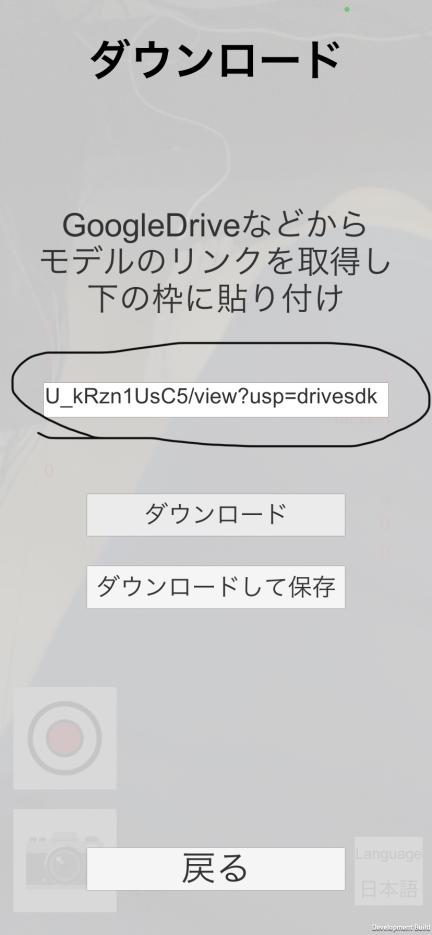
3,In the main menu, select "Download from URL".
4,Paste URL retreved in 2 to InputField and click "Download".if you click "Download and Save",downloaded file will store in your iphones Storage.
5,Stop link share in 2.
最終更新:2020年10月28日 18:38