● About
You need open the port.
You do this at your own risk.
② Unzip UPnPCJ132.zip.
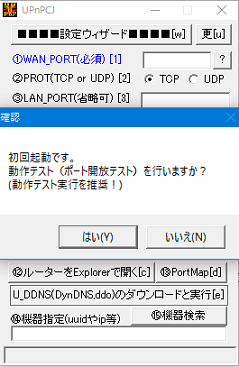
③ Execute UPnPCJ.exe. Click "はい".
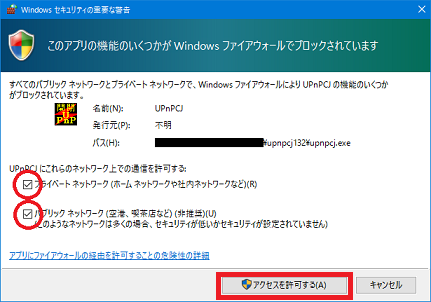
④ Check 2 checkboxes. Then click 「Permit the access」.
⑤ Setting in the below.
1. WAN_PORT → BingoMario default 60000
2. PORT → TCP
3. LAN_PORT → BingoMario default 60000
4. LAN_IP → input Automatically
5. COMMENT → "BingoMarioServer"
6. WAN_IP → Input your Global IP.
Click "WAN_IP[6]→" button, then input automatically.
※ You need to write this IP in the memo. Because you need to tell other entrants.
※ You should NOT tell this IP to others except entrants.
7. ショートカットを作成 You should check.
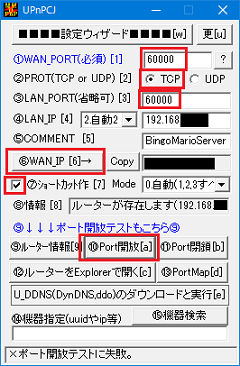
⑥ Click "⑩Port開放".
Then, make the shortcut of port open/close in the desktop.
※ If you make BingoMarioServer, you click the shortcut of "60000ポート開放".(open)
If you finish BingoMario and stop server, you click the shortcut of "60000ポート閉鎖".(close)
最終更新:2018年07月11日 00:45



