




STEPS to enter Creator page/作者ページ投稿ステップ
1. Open Creator Template / 作者テンプレートを開きます
2. At the top of the template, find & click the highlighted part shown in the screenshot below.
開いたテンプレートのページ上部にあるスクリーンショットと同じ部分をクリックします。
開いたテンプレートのページ上部にあるスクリーンショットと同じ部分をクリックします。

3. Write the title in following form and submit.
以下の形式でタイトルを書き作成を押します。
以下の形式でタイトルを書き作成を押します。
Romaji Of Creator/Artist Name
If there's a title named サンプル太郎P, it'll look like this.
SanpurutarouP

4. Follow the instructions written in the Edit form and fill in the appropriate information.
編集フォーム内の指示に従い、項目を埋めます。
編集フォーム内の指示に従い、項目を埋めます。
5. Last, add two TAG: Creator and "Romaji of Creator Name".
最後にCreatorと"作者名のローマ字"の二つのタグを追加します。
最後にCreatorと"作者名のローマ字"の二つのタグを追加します。
For example, if the creator's name is 作者P, the romaji is SakusyaP, so TAG will be
Creator,SakusyaP
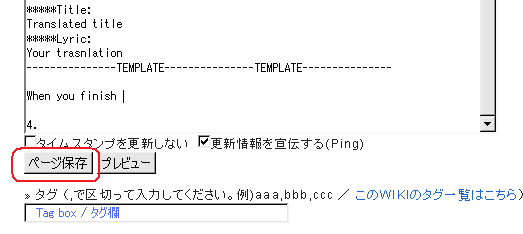
6. To submit changes press the button circled in red.
ページ保存ボタンで投稿します。
ページ保存ボタンで投稿します。
_

