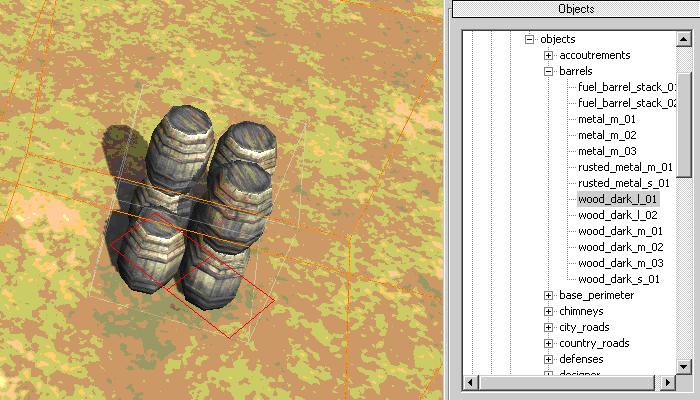
This tool allows the user to place objects in the world. Click the Object Icon from the top toolbar, next select an object from the Tree View (bottom right toolbar) and then right-click on the terrain in the main window. But remember your object is live; every time you right-click the screen you get another set of barrels. For more detailed information about Object Placement see below.
Note: Barrels are located at ebps/environment/art_ambient/objects/barrels
ノート:樽は、ebps/environment/art_ambient/objects/barrels にあります
Placing Objects 物を置くこと
To place a new object or squad, select it from the Objects Tree View and then right-click on the terrain in the main window.
新しいオブジェクトまたはチームを置くために、Objects Tree Viewからそれを選んでください、それから、メインウインドウで地形を右ボタンをクリックしてください。
Objects fall under 3 categories:
オブジェクトは、3つのカテゴリーに分かれます
Entities ('ebps') 実体
Squads ('sbps') チーム
Visual Only ('vis or visuals') ビジュアルのみ
Entities 実体
Entities or ebps include all buildings, bridges and world objects. These are located under ebps --> environment. They are further organized into art ambient (man made objects), art nature (natural objects) and art tools (art aid objects).
Squads or sbps are playable entities, such as, soldiers and vehicles. They are usually used in single player scenarios and should be placed by Designers. They should not be used in multiplayer maps. They are located under sbps --> races.
Visual Only objects are just models existing in the world. They don't have any simulation properties, and as such do not affect anything in the game or receive damage. They are purely decorative objects and should be used as such. The advantage of Vis objects is, that because of their lack of visual properties they do not slow down the simulation. They are located under visuals --> environment.
World object builders: 世界オブジェクト建築業者
The visuals list is built by scanning the Data/Art/Models directory.
Any RGM files that are found that aren't being referenced
by any EBPS or SBPS are considered visuals. What this means is that
any models being used by simulation Entities don't show up
in the visuals list.